GET FREE SOFTWARE WITH SERIAL AND CRACK CLIK HERE

GEt ANY REGISTERES SOFTWARE WITH SERIAL AND CRACK AND ENJOY.

LEARN WEB HACKING CLIK HERE

LEARN WEB HACKING AND ITS JUST FOR EDUCATIONAL PURPOSE.

COOKIES TATOURIAL CLIK HERE AND LEARN

LEARN COOKIE TATOURIAL BUT ITS JUST FOR EDUCATIONAL PURPOSE.

HOW TO TRACE IP ADDRESS CLIK HERE AND LEARN

LEARN HOW TO TRACE IP ADDRESS BY IP YOU CAN ACCESS AND HACK ANY COMPUTER.

My Blog List

Showing posts with label window 7 Tricks. Show all posts

Monday, February 27, 2012

How to Install Windows 7 from USB Drive


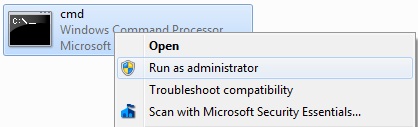
Go to Start menu > All programs > Accessories, right click on Command Prompt and select Run as administrator
How to Install Windows 7 from USB Drive
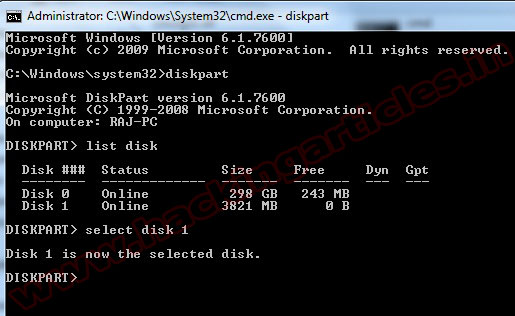
Now type diskpart and press Enter
Next type Lis Disk command and note down the Disk number of your USB flash drive. Select disk 1
How to Install Windows 7 from USB Drive
Now you can use following commands step by step
clean 
create partition primary 
select partition 1 
active
format fs=ntfs 
assign 
exit
How to Install Windows 7 from USB Drive
Now insert your Windows7/Windows 8 DVD in your CD/DVD drive and check the drive letter of the DVD drive and note down the “drive letter” of your DVD drive. In my case, it is “j:” Now type the following list of commands as shown below:
J:  cd boot   (Where “j” is my DVD drive letter).
cd boot 
bootsect.exe /nt60 h:    (Where “h” is my USB drive letter) 
exit
How to Install Windows 7 from USB Drive
Copy your Windows 7 DVD contents to the USB flash drive.
Your USB drive is ready to boot and install Windows 7.

Wednesday, February 15, 2012

Share ur File anywhere without uploading


1. firstly you visit http://www.filesovermiles.com/ Click Browse to select you files, which you want to transfer.

2. As soon as select your file, it will generate a unique url which you have to give to other person with  whom you  are sharing that files.

After can give him via email or chatting.

3. (For 2nd user) the pc on the receiving end of this file transfer must go this unique url and click download to transfer file from PC to PC (Direct  Connection)

Thursday, January 19, 2012

Get a Free Windows 7 Product Key


Windows 7 is the next release of the Windows client operating system, built on the secure foundation of Windows Vista and Windows Server 2008. Performance, reliability, security, and compatibility are core tenets of this release as we collect your feedback to meet our engineering goals of making Windows 7 the best-performing and most stable Windows operating system to date. All the new innovations in this product are meant to enhance your capability as an IT professional to better provision and manage increasingly mobile PCs, to protect data, and to improve end-user and personal productivity.

Free Windows 7 Product Key: R994D-37QGM-XYGYV-96JTR-3C9T2


Please Note: I need to mention that after more use of this product key, about 50 or less, Windows will deactivate it. This happen with my last product key. So hurry up! 

Do you have questions, comments, or suggestions? Feel free to post a comment! 

Wednesday, January 11, 2012

How to Repair corrupted files in windows manually


Are you getting system errors while running windows operating system or start up? Does your windows file display message reinstall or windows file errors? Does viruses hascorrupted your system files? Does your important windows files got deleted? Most important your shortcuts and windows programs are not working properly? Does yourregistry got corrupted and displaying registry errors? I know its quite irritating whenyou got such error message in middle or start up. Most guys think that external software's and formatting system can only solve such problems. If you are one of them, i will prove that you all are wrong and we can repair our system as perfect new one withoutinstalling any new software or formatting windows system. We can repair our system in less than 5 minutes and most amazing thing is that i will explain you manual method of doing that. So friends, today i am going to explain you How to repair corruptedsystem files in windows manually. For repairing system, you just need to know windows inbuilt tools that almost 99% of guys doesn't know as windows never focused on that feature. 

I have also explained another method in my previous post "How to fix corrupt files in windows". So today i am explaining a new manual methods to fix windows errors andrepairing system files.
Yesterday i was browsing my sytem32 folder in windows and checking some executable. I was very curious what these executable do and in fulfillment of my curiousness i found something really awesome that will make you all of them crazy. I founder something called"webfldrs" and you all will be amazed to see what it serves. Its absolutely serves for different purpose as its name suggests. This windows executable repairs everything in windows system. Its has several features listed below:
1. Repairs all detected reinstall problems.
2. Verify and repair registry entries for user windows programs.
3. Validates the shortcuts.
4. Reinstall if the file is missing, or an older version exists.
5. Reinstall if file has different version.
6. Reinstall the dll or exe if file has different or invalid checksum.
7. Verify local registry entries are present and repair if not.


Guys can you make a guess which of the above features i like most?? I love 5 and 6 feature the most? Why?? Answer is quite tricky but easy to guess. Reinstall if file has different version, or different check sum or invalid check sum. What the hell is this checksum.. Aha..... Checksum is the technique or method to verify the integrity of file. When Microsoft has designed exe or dll or simply a file they have calculated a checksum parameter. Now when some virus infects that file or attach itself to it, what happens is that, its value of checksum changes(as checksum calculation is based on bits, as extra code is added to it so its size surely gonna increase and number of bits involved will also change). So you now come to know why i like 5 and 6 points. If still not, guys they fixes the windows system files that viruses has infected or corrupted.
 That was the background as i want to teach you hacking not just wanna make you script kiddie. So lets learn how to repair corrupted system files in windows manually.

Steps to repair or fix windows manually:
1. Go to drive in which you have installed operating system. In my case its C drive. 
2. There you will see a Windows folder. Go to Windows folder and then enter into system32 folder. Now there go down and search for webFldrs file.
Here is complete path:
C:\WINDOWS\system32\webfldrs.msi


t:3. Open WebFldrs file by double click it, you will see something like below snapshot


4. Now a window will pop up. Select all the options as shown below and click on OK.


5. Now after you click Ok, you are back to previous window. There click on reinstall as shown below:
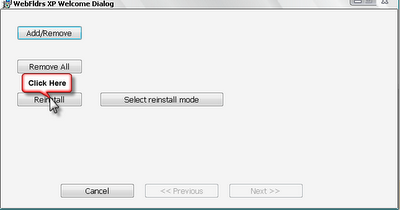
hacking tips and tricks to fix corrupted registry and system files
Click on reinstall to repair windows file system
6. When you click on that you will see below windows of repairing your files. This may take 20sec to 5 minutes depending upon your systems condition. 
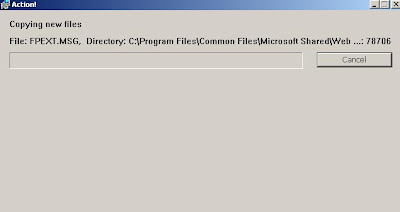
hacking tutorial to fix corrupted files
Repairing files window
repair corrupted files, registry errors manually
Repair has been completed.


7. That's all my friends. Its done you have fixed your windows system files.


If you like my post please comment. If you have any queries ask me in form of comments...
Share you love by sharing this article with your friends.

Tuesday, January 3, 2012

Windows 7 speed up the start up process


How to Speed up Your Windows 7 Performance
If you run a lot of applications and you think that your Windows 7 is too slow for your tastes, here is another way to speed up Windows 7 boot by enabling the Boot-Only fetching feature.
1. Click Start.
2. Go to the Search programs and files textbox, type regedit.
3. Click Regedit.exe
4. If the UAC window appears, click Yes.
5. In the registry, locate this subkey: HLKM\ SYSTEM\CurrentControlSet\ Control\SessionManager\MemoryManagement\ PrefetchParameters.
6. In the right pane, double-click EnablePrefetcher.
7. Change the value to 2 and click OK.
8. In the right pane, double-click EnableSuperfetch,.
9. Change the value to 2 and click OK.
10. Exit the registry and restart your computer for the changes to take effect.
11. Next time you turn on your computer, the prefetcher will reserve more resources to the booting process instead of booting and application launching.

Monday, January 2, 2012

Activate Windows 7, In 20 Seconds! ( MAKE 100% GENUINE)


windows-7-seven-crack-activate-activador-activar

If you activate your Windows 7 you can use it without restriction, including lowering the security updates.
The activator works with versions of Windows 7 Home Basic, Windows 7 Home Premium, Windows 7 Professional, Windows 7 Enterprise and Windows 7 Ultimate.

How To Activate Windows 7


We start assuming that the guidance we have already fully installed Windows 7 in the absence of activation.
You can get off the trigger from the following download (no virus, no trojans and no bullshit)
Once the trigger down, it should be considered to be run twice to work properly.
The first time we execute it and the next little screen appears, reboot your computer and spent the next step.

After restarting your PC re-run the installer for us to display the next screen.
We chose the logo you want, is irrelevant since only see when we look at the properties of our team, once elected, and then click on Activate Install as shown in the image.

In theory we have finished the activation, if we go Team, we click on it with the right mouse button and choose Properties, we can see our copy of Windows 7 fully activated.
As you can see, I chose the logo activation AlienWare and so now appears in the Properties.

Disable Windows 7 Updates


The final step will be to turn off automatic updates because if you activate and install updates microsoft will detect that your copy of windodws 7 is not original and we will disable the windows.

Serials Windows 7


I dont know if others will like my system but I need serials hicieorn. When I reached the point where one had to enter, simply tell him next and you’re done. With the trigger I did not need to define serials anywhere.
But just in case, here I leave a few:


Microsoft Windows 7 Activator || 10000% Work || 3.62 MB


Microsoft Windows 7 Activator || 10000% Work || 3.62 MB


Microsoft Windows 7 Activator || 10000% Work || 3.62 MB
It can active all version of Windows 7Registration code: 093575-80836921-796672NB: To use this activator u have to at least 1 day trial period. If u have 0 day trial period, please reinstall your windows then try this activator
Microsoft Windows 7 Activator || 10000% Work || 3.62 MB


Tuesday, December 27, 2011

Extend the Windows 7 Trial from 30 to 120 Days


Did you know that you can install Windows 7 without any license key and use it for 30 days? What you might not know is that you can also extend that trial mode to 120 days, without requiring a key.
The basic way this works is that at the end of the 30 days, you’ll need to run a small command and reboot your computer, at which point you’ll have 30 more days, up to a maximum of 120 days. This trick should work regardless of where you got your copy of Windows 7 from.
Extending the Trial By 30 Days
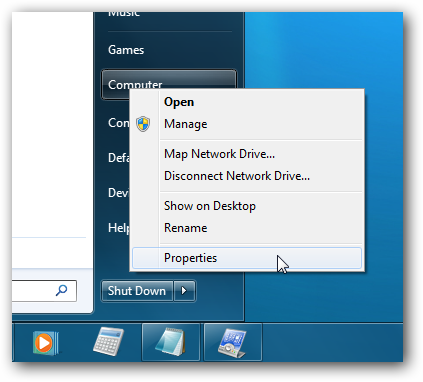
The first thing you’ll want to do is check how many days are left in your trial period. You can do this by right-clicking Computer and choosing Properties…
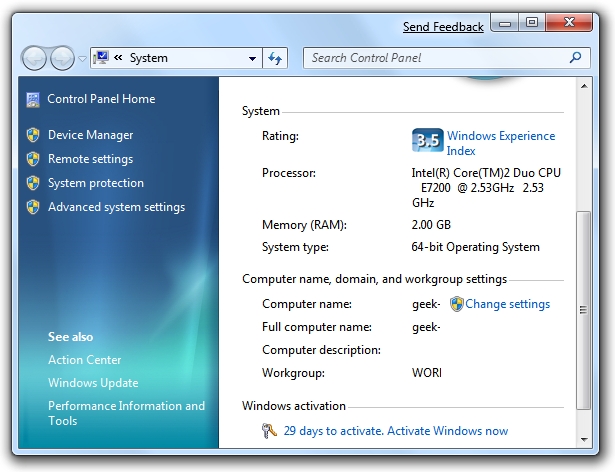
At the bottom of this window you’ll see how many days are left to activate (29 in my case since I installed this box yesterday).

Now to actually perform the hack that will extend the trial mode, you’ll want to findCommand Prompt in the start menu (or search for it), and then right-click on it and choose Run as administrator. (very important)
Windows 7 Command Prompt as Administrator
Next you’ll simply type in this command:
slmgr -rearm
Windows 7 slmgr rearm
Within a few seconds you’ll normally see this dialog show up, saying that the command has completed successfully, at which point you’ll want to reboot.
Windows 7 slmgr Success
Checking the system properties again shows that I now have 30 days left to activate.
Windows 7 Activation 30 days
Of course you’d normally want to do this near the end, probably on the last day before activation. I’m pretty sure that you can even perform this trick after the 30-day trial expires, although I’m not certain yet.
Credit Goes to - GEEK
                              

How To Restrict Access To Drives In My Computer In Windows


If you have a shared or public computer that several people use, you might want to restrict access to it’s drives to prevent users from deleting important data. Today we look at restricting access to some or all drives on the machine using Local Group Policy.
Note: This method uses Local Group Policy Editor which is not available on home versions of Windows 7 or Vista
First type gpedit.msc in the search box of the Start Menu and hit Enter.
gpedit_start
Now navigate to User Configuration \ Administrative Templates \ Windows Components \ Windows Explorer. Then on the right side under Setting, double click on Prevent access to drives from My Computer.
2drive
Select Enable then under Options from the drop down menu you can restrict a certain drive, a combination of drives, or restrict them all. The main drive you would probably want to restrict is the C:\ drive or which ever lettered drive Windows isinstalled on. Restricting all drives means they can’t access the CD or DVD drive, and cannot use a flash drive if they need to get files from it.
Note: This setting won’t prevent users from using programs that access the local drives.
drive
The restrictions take effect immediately, no restart is required. When a user opens up My Computer they’ll be able to see which drives are listed, but when they try to access a restricted drive, they’ll get the following error message.
1-drive 
For the screenshots in this tutorial we used Windows 7 Ultimate, but this process also works with XP Professional and Vista (not in Home versions) the screens just look different.
22drive
Local Group Policy allows you to customize several settings for how you want to administer your machine. Restricting access to certain drives in addition to other security and access measures, can help  keep a shared computer stable and secure.