GET FREE SOFTWARE WITH SERIAL AND CRACK CLIK HERE

GEt ANY REGISTERES SOFTWARE WITH SERIAL AND CRACK AND ENJOY.

LEARN WEB HACKING CLIK HERE

LEARN WEB HACKING AND ITS JUST FOR EDUCATIONAL PURPOSE.

COOKIES TATOURIAL CLIK HERE AND LEARN

LEARN COOKIE TATOURIAL BUT ITS JUST FOR EDUCATIONAL PURPOSE.

HOW TO TRACE IP ADDRESS CLIK HERE AND LEARN

LEARN HOW TO TRACE IP ADDRESS BY IP YOU CAN ACCESS AND HACK ANY COMPUTER.

My Blog List

Showing posts with label internet tricks. Show all posts

Monday, February 27, 2012

How to Install Windows 7 from USB Drive


Go to Start menu > All programs > Accessories, right click on Command Prompt and select Run as administrator
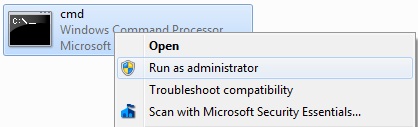
How to Install Windows 7 from USB Drive
Now type diskpart and press Enter
Next type Lis Disk command and note down the Disk number of your USB flash drive. Select disk 1
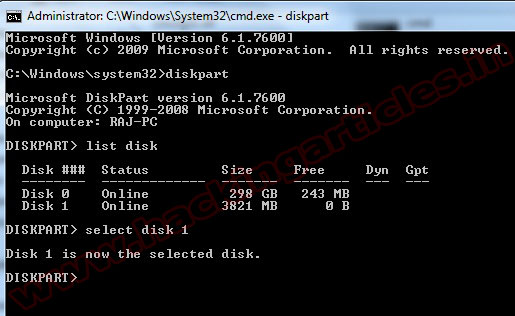
How to Install Windows 7 from USB Drive
Now you can use following commands step by step
clean 
create partition primary 
select partition 1 
active
format fs=ntfs 
assign 
exit
How to Install Windows 7 from USB Drive
Now insert your Windows7/Windows 8 DVD in your CD/DVD drive and check the drive letter of the DVD drive and note down the “drive letter” of your DVD drive. In my case, it is “j:” Now type the following list of commands as shown below:
J:  cd boot   (Where “j” is my DVD drive letter).
cd boot 
bootsect.exe /nt60 h:    (Where “h” is my USB drive letter) 
exit
How to Install Windows 7 from USB Drive
Copy your Windows 7 DVD contents to the USB flash drive.
Your USB drive is ready to boot and install Windows 7.

Wednesday, February 15, 2012

Ctrl+C may be the most important work we do everyday. But it's not a very safe thing to do.


Hi,

Here is some useful information for all.

Ctrl+C may be the most important work we do everyday. But it's not a very safe thing to do. Read on to know why. What happens when you press Ctrl+C while you are Online... We do copy various data by Ctrl + C for pasting elsewhere.

This copied data is stored in clipboard and is accessible from the net by a combination of Javascripts and ASP.

Just try this:
Note: works only when u are using "Internet Explorer.."

1) Copy any text by Ctrl + C
2) Click the Link: < http://www.sourcecodesworld.com/special/clipboard.asp

3) You will see the text you copied was accessed by this web page.

Do not keep sensitive data (like passwords, credit card numbers, PIN etc.) in the clipboard while surfing the web. It is extremely easy to extract the text stored in the clipboard to steal your sensitive information.

SAVE YOURSELF FROM ONLINE FRAUDS!!!!

Note: works only when u are using "Internet Explorer.."

Tuesday, February 7, 2012

How to Show Who Is Online On Facebook While You Are Offline Mode


Hello Friends Im going to share you rocking tricks 

First you will go to the login the Facebook after you can go the offline chat in Facebook account.
clik on goto app


then clik on Allow

After install this application you able to show, who is online on Facebook while you are offline on Facebook account. 


How to Find Blocked IP by Countries


hello Guys another rocking tricks

IP Info Database
The list of IP address by country below is a grouping of IP by country and CIDR of our database. The data has over 99.5% accuracy on a country basis. The database is updated monthly.


IP Deny
IPdeny compiles raw data from regional internet registries and offers complete country IP blockdownloads for on-line users. Our country IP zone files can be easily used in your applications and web sites to minimize on-line fraud, SPAM, floods and brute force attacks.


Country IP Blocks
The following Country hyperlinks contain IP Blocks in CIDR (Classless Inter-Domain Routing) format. Each file is listed by country block and includes the MD5 Checksum value for the latest country specific data. Each file contains the latest data from our Country IP Database.


Thursday, January 19, 2012

SHUTDOWN SPEEDY


Hello friends, today I'll tell you how can you turn off your system in less than 5 seconds, this is an easy and effective way to turn off system quickly, We all know that when we turn off system it takes lots of times to shutdown
window, many of people use HIBERNATE option to avoid this but i found an easy way by which you can turn off window quickly less then 5 seconds. 


Follow these steps                                                       

  • Open "Task Manager" (ALT+CTRL+DEL)
  • Click on "Shutdown" option.
  • Press CTRL key when you select Turn off option.(Within 5 seconds or less your system will be turn off) 
Safety Tip: Do not use this trick if your system show any error while shutting down.

Note: This trick is applicable for Xp not for Vista and Window 7.

Hope this is informative, kindly post your views and suggestions or comment on it.

Saturday, January 14, 2012

HOW TO POST EMPTY STAUTS IN FACEBOOK


  • Login in your Facebook Account.
  • Go to the status update field.
  • Holding Alt key and type 0173.
  • Now release the Alt key and post.

           OR

  • Go to Facebook status.
  • Type @[2:2: ]
  • post it.

Friday, December 16, 2011

How to Find Who is Invisible or blocked you on Google chat/Gtalk


Google chat/Gtalk". So guys are you ready to know that which of your friend has blocked you on google talk.

hack gmail,hack gtalk,find invisible or blocked

Whenever you noticed a contact in your Gtalk/Google Talk has not been online for some time, have it ever crossed your mind you’ve been blocked? If you are curious in finding out who actually blocked you in Gtalk, here’s a workaround you can try.
This following method we attempt to show make use of a chat client call Pidgin.

STEPS TO FIND WHO IS INVISIBLE OR BLOCKED YOU ON GOOGLE CHAT:

1. Download, Install Pidgin

Click here to download Pidgin chat client. If you already have Pidgin installed, you may skip this step.

2. Configure Pidgin for Gtalk

You’ll probably start with the below screen. Click the Add button. "Accounts -> Manage Account" will also bring you to the same screen. Let’s add Gtalk to Pidgin.

hack gmail,hack gtalk,find invisible or blocked
Configure Pidgin Welcome Screen

Clicking Add will allow you to add new Gtalk account. The following two screenshots show what you need to fill up for Basic and Advance tab, pay attention to those highlighted.

hack gmail,hack gtalk,find invisible or blocked
Add Account Basic Tab

hack gmail,hack gtalk,find invisible or blocked
Add Account Advanced Tab

With all the settings properly entered, you should be able to connect to Gtalk and load your contacts successfully. Now let’s go find out who blocked you.

3. Who’s Blocking You?

When someone blocked you in Gtalk (and other IMs), they appear offline just like your other contacts who are really offline. Right click, click on Get Info, and we’ll see how to differentiate them.

hack gmail,hack gtalk,find invisible or blocked
Get Info that who has blocked you or simply hiding Himself

The following image is a comparison of 2 different contacts: Actual offline (left) and Blocked offline (right). If you are blocked, nothing will be display under Buddy Information.


hack gmail,hack gtalk,find invisible or blocked
Comparision of Person who is offline and person who is invisible.


Thats all Now you can easily find out who is really offline and who is blocking you from google chat. So guys I hope you all have enjoyed it.
If you like our posts , then please comment . All queries are heartily welcomed.
Enjoy and have happy Hacking!